Wednesday, March 18, 2009

Tampa Wedding Photography

Brad and Cindy were married on Saturday and I had the privilege of being their photographer. More Tampa wedding photography pictures can be seen on my website but here are a few of my favorites from the day.

The reception was held in an office building which made for a tough time finding a good location to shoot some couple's pictures. I recently had a client tell me that a photographer had told her that she wouldn't get good pictures because of the time of day she had scheduled her wedding. That's ridiculous. A good photographer finds a way. Lucky for me there was a brick wall right by the entrance. All wedding photography can benefit from a good brick wall. :)


I loved this picture the minute I saw it but for some reason it just screamed "old." Maybe it's because I like those magazine ads that feature pictures from the 70's. This picture just looked to me like something you would see in the album of a couple married for 20 years. So, I aged it a little in Photoshop.


When Cindy told me how big her wedding party would be I decided to break out the big lights. The trend currently is to take casual formal pictures (and I do..) but there is still something to be said for the old-fashioned, full group shot. With a group this big you really need a couple of large studio lights to get a good, even light across the entire frame.


I was setting up to shoot Cindy in front of these doors when a bridesmaid said, "Let's put Brad on the other side!" Great idea!


Here's the shot I was setting up when I took the one above. The scenery outside the doors wasn't the best so I frosted the glass in Photoshop.


Another reminder that I need to keep a sewing kit in my camera bag. They had to send down to the front desk for a needle and thread when one of the loops broke on Cindy's dress.


Tuesday, March 3, 2009

Tampa engagement pictures

For more engagement pictures go to my website http://www.boorayperry.com/

“So,” I said, “How do you feel about standing in traffic?”

A few weeks ago I had this idea for a shot. I wanted to shoot a couple surrounded by blurred movement while they stood frozen in time… in their own world. The first obstacle to overcome was how to shoot a long exposure on a sunny day. A neutral density filter solved that problem ( I used a 6 but really needed a 9). Next I had to get the couple. Lucky for me I was getting ready to shoot an engagement session at the University of Tampa which sits on Kennedy Blvd, one of the busiest roads in town.

So, after about an hour and a half with my clients I finally asked them to stand in traffic. They were totally on board with the idea and stood there without moving for about 15 minutes while I stood on my own little traffic island with my tripod, shooting away.

Now that it’s done I’m pretty pleased with it for a first time effort. Of course, off the top of my head I can think of five things that are wrong with it but that’s the perfectionist in me and I’ll do better next time. (By the way, I really want to do this shot with people as the blur… like in the middle of a busy crosswalk.)


The entire shoot was great. Here are few more images, see the rest at http://www.boorayperry.com/


Monday, February 16, 2009

Bar Mitzvah Photography in Tampa

For more Bar Mitzvah photography, visit my website www.boorayperry.com.

I shot the Weinstein Bar Mitzvah in Tampa on Saturday. It was a nice event and great people. One of the things that they did (which I always think must be great) is hold the party in the same hotel that most of the out-of-town guests are staying in. It's just so convenient when you don't have to worry about transportation for everyone.


The trend right now at Bar Mitzvah's is to turn the lights down and pass out a bunch of glow-sticks, etc. This makes it tough on me because if I use flash you can't see the lights and if I don't, everything is a blur. So, I try to corral a couple of kids and play a game I call, "How still can you stand while I take this long exposure."

The "Cha-Cha Slide." It always seems like the Moms are having the most fun at these Mitzvah's, which is only fair since they usually do all the work!


As always, when ever there is a lull in the activities, I start looking for the kids.


The theme for the Bar Mitzvah was "World Cup Soccer."


Wednesday, February 4, 2009

Family Portrait Session - University of Tampa

For more family portrait, visit http://www.boorayperry.com/

I had a session at University of Tampa last week with John, Sandi and Jack. Sandi was the winner of our Free Family Portrait Session that we gave away in conjunction with Parent Guide magazine. They were just wonderful the whole time and little Jack was just a dream. So many people say that photographing children is hard but it really depends on the child because Jack takes to the camera like a champ.


Friday, January 30, 2009

Snapshots of the legends of sports

It's Super Bowl Week here in Tampa and that means lots of events. This week I worked with a client of mine who was sponsoring a charity golf tournament and needed a photographer for publicity stills, etc. There were quite a few big names at the tournament, starting with Seth Joyner who is the host of the event. Ozzie Smith, Eric Dickerson and Brett Saberhagen were there as well along with many other NFL stars. But. the big surprise was Lawrence Taylor, considered by many to be the greatest defensive back ever to play the game and Evander Holyfield, former heavyweight champion of the world.


I managed to get some good shots despite the fact that they were either practicing on the driving range or being mobbed by fans the whole time. "LT" was particularly hard to shoot because he was running a little late and everyone wanted a piece of him (only Holyfield got more attention). I asked him for a shot as he was about to light his cigar and he just looked up and said, "Go."

Thursday, January 22, 2009

If I can make myself look this good, imagine what I can do for you...

For more of my family and wedding photography here in Tampa Bay, visit my website.

Last night I was working in the studio on some ideas for my daughter's upcoming birthday party. Basically, I was trying to decide what to do with the background color since I will be taking pictures of a dozen 5-year-olds in princess dresses (it's gonna be a hoot).

After shooting a few self-portraits I got the idea to do a magazine re-touch on myself. Whenever I do a boudoir session, I do a magazine re-touch, which means I make you look like you should be on the cover of a magazine. The problem with this feature is that I don't really have many before/after examples I can show because I won't show a past clients boudoir pictures to anyone under any circumstances (naturally). So, I've decided to do a re-touch on the worst face I can find: mine!


Pretty scary, I know. As you can see in the re-touched version below, I cleaned up the blemishes, smoothed the wrinkles, removed a catch-light from the eyes and fixed the color a little. If you look closely, you can also see where I raised the bottom lid of my right eye just a tad. My right eye is wider than my left and so I corrected it a little but not so much that it would be obvious. Now I don't look so bad!


By the way, as you can see I was working with a blue background when shooting this portrait. However, the background isn't actually blue, it's being lit with a blue light. Wanna guess what color the background is when the light is off?

Thursday, January 15, 2009

Sunset

For more examples of my work, got to http://www.boorayperry.com/.


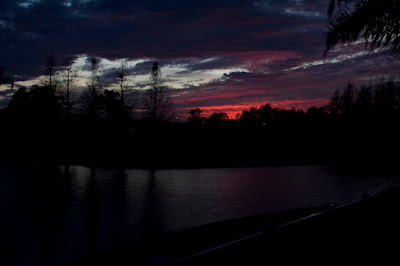
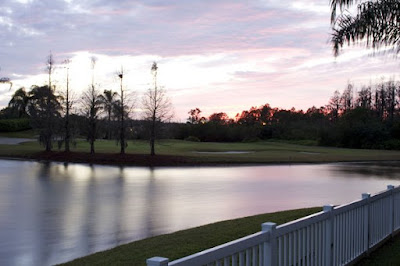
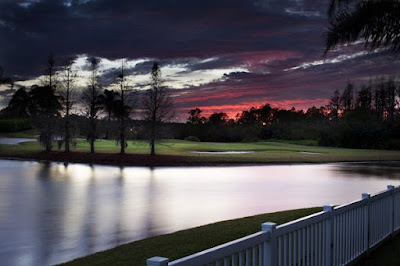
Last night my daughter pointed out what a beautiful sunset we were getting so I stepped outside to get a shot. I think that most people don't realize that Photoshop plays a big role in professional photography today, even something that seems simple, like a quick picture of the sunset. The picture below is actually two different pictures. What I did was set up my tripod and shoot the same picture two times.


The first time I exposed for the sky and since I really wanted the red to show up, I underexposed the shot.:


The second time I wanted the water to show up so I overexposed the shot:


Finally, I put the two images into Photoshop and combined them... using the top from one and the bottom from the other. Then I touched it up a little with some shading, lightened up the golf course grass, sharpened etc. and ended up with the finished product: